Biggest Huntsman V2 Buying Mistakes (And How to Avoid Them)
Introduction
The Razer Huntsman V2 has quickly earned its place as one of the most talked-about gaming keyboards in the market. With promises of optical switches, ultra-fast response times, and a robust design tailored for gamers and professionals alike, it’s no surprise that prospective buyers find themselves considering this device for their next upgrade. Yet, with so many expectations, features, and variants, it’s easy to make purchasing mistakes that can lead to disappointment or underutilization of the keyboard’s true potential.
This article delves into the most common mistakes buyers make when purchasing the Huntsman V2 and provides actionable guidance to help avoid them. Whether you’re a competitive gamer, a typist, or a hybrid user, understanding what truly matters for your needs is essential to making an informed choice.
Huntsman V2: Detailed Product Analysis
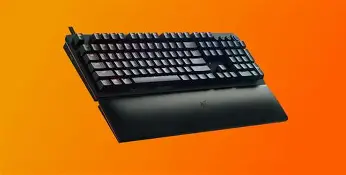
The Huntsman V2 is positioned as Razer’s flagship wired gaming keyboard, offering their latest optical switch technology, advanced onboard processing, and a range of features designed to cater to both performance-focused and comfort-oriented users.
Key Features:
- Razer Optical Switches (Linear and Clicky Variants)
- 8,000 Hz HyperPolling Technology
- Double-shot PBT Keycaps
- Sound Dampening Foam for Reduced Keystroke Noise
- Aluminum Top Case Construction
- Dedicated Media Keys and Multifunction Digital Dial (Full-size variant)
- Detachable Wrist Rest
- Onboard Profile Storage
- Fully Programmable Keys with On-the-Fly Macro Recording
- Razer Chroma RGB Lighting
Out of the box, the V2 delivers a premium experience. The choice between linear (smooth and quiet) or clicky (tactile and audible) switches means users can tailor the feel to their preferences. Its high polling rate ensures ultra-responsive performance, a key factor for fast-paced competitive gaming.
Biggest Mistakes Buyers Make (And How to Avoid Them)
1. Not Choosing the Right Switch Variant
One of the defining features of the Huntsman V2 is its optical switch variety. Buyers often overlook the impact that switch type has on typing and gaming experiences.
- Linear Optical Switches: Smooth and quiet, suited for rapid actuation—ideal for FPS gamers and those who type with a lighter touch.
- Clicky Optical Switches: Offer tactile and audible feedback, better for those who require confirmation of keypresses or enjoy a more traditional typing feel.
Common Mistake: Selecting a switch based on trend or marketing hype rather than personal preference or use case.
How to Avoid: Visit local electronics stores to try both switch types, or reference sound and actuation force demos online. Consider your usual tasks—if you share a workspace or stream, linear (quieter) switches may be preferable.
2. Ignoring Keyboard Layout and Size
The Huntsman V2 is offered in multiple layouts, mainly the full-size and tenkeyless (TKL) variants. Each has a distinctive footprint and feature set.
- Full-Size: Includes dedicated numpad and media controls, better for productivity and media consumption.
- Tenkeyless (TKL): Compact, omits the numpad, more portable and gives extra mouse space for low-DPI aiming, commonly preferred by FPS players.
Common Mistake: Choosing the wrong size/layout for your workspace or needs, leading to inconvenience or unused features.
Shop the latest Electronics picks on Amazon.
See Deals →How to Avoid: Take stock of your desk space, and assess whether you need a number pad or media dials. If portability and mouse space are priorities, the TKL is a better fit.
3. Overlooking Sound Dampening and Keycap Quality
The quality of typing noise and the durability of keycaps are crucial, especially for users in shared spaces or those who type extensively.
- Razer’s onboard sound dampening foam in the V2 helps reduce “pinginess” or harsh keystroke sounds, but this doesn’t silence the keyboard fully.
- Not all keycaps are created equal: the V2 uses durable double-shot PBT keycaps, but some regional layouts might use ABS versions, or aftermarket variants may not fit perfectly due to stabilizer or stem differences.
Common Mistake: Assuming the keyboard is silent out-of-the-box or that all keycap sets will fit without issue.
How to Avoid: Watch real-world typing sound tests online and verify the keycap material in your region. For custom keycaps, double-check compatibility—not all third-party sets support Razer’s optical stems or stabilizer sizes.
4. Underestimating Software Requirements
The Huntsman V2’s full feature set depends on Razer Synapse software for features like RGB customization, macro programming, and HyperPolling rate adjustments.
Common Mistake: Believing all features are hardware-based or that Synapse is optional if you wish to use advanced lighting or macro capabilities. Some users with strict IT environments find that Synapse isn’t allowed, restricting functionality.
How to Avoid: If you cannot (or do not want to) install external configuration software, understand that lighting will default to a static preset and onboard profiles are limited compared to the full Synapse experience. Ensure your environment allows Synapse, or be comfortable with the device’s default settings.
5. Not Considering Competitive Alternatives
While the Huntsman V2 excels in responsiveness and durability, other brands and models may offer different strengths, such as wireless connectivity, hot-swappable switches, or alternative form factors. Buyers sometimes make decisions based purely on brand loyalty or flashy features.
Common Mistake: Overlooking alternatives with features more relevant to specific use cases, such as wireless gaming, quieter operation, or a smaller/larger layout, resulting in buyer’s remorse.
How to Avoid: Analyze your primary needs. For users who travel regularly, a wireless or ultra-compact keyboard may be more practical. For custom builders, hot-swap support can provide more flexibility.
Looking for the best Electronics deals on Amazon?
View Offers →Pros & Cons of the Huntsman V2
- Pros:
- Extremely low latency with 8,000 Hz polling
- Durable double-shot PBT keycaps (on most layouts)
- Comfortable magnetic wrist rest (full-size)
- Customizable per-key RGB with deep software integration
- Choice of quiet linear or tactile clicky switches
- Robust build quality with aluminum top case
- Dedicated media controls (full-size)
- Cons:
- Full feature set requires Razer Synapse software
- No wireless options for the V2 (wired-only)
- Some keys (spacebar, larger stabilizer keys) still transmit noise on bottoming out
- Limited compatibility with third-party keycap sets
- Higher price point compared to non-flagship keyboards
- Larger footprint for full-size variant
Comparison: Huntsman V2 vs. Key Competitors
| Feature | Huntsman V2 | SteelSeries Apex Pro | Logitech G915 TKL |
|---|---|---|---|
| Switch Type | Razer Optical (Linear/Clicky) | OmniPoint Adjustable Mechanical | Low-profile GL Mechanical (Tactile, Linear, Clicky) |
| Polling Rate | Up to 8,000 Hz | 1,000 Hz | 1,000 Hz |
| Form Factors | Full-size, TKL | Full-size, TKL | TKL |
| Wireless Option | No | No | Yes (Lightspeed/Bluetooth) |
| Dedicated Media Controls | Full-size only | Yes | Yes |
| Keycap Material | PBT (double-shot) | ABS (standard) | ABS (standard) |
| Custom Switch Swap | No | No (but adjustable actuation) | No |
| MSRP Range | High | Very High | High |
| Software Suite | Razer Synapse | SteelSeries Engine | Logitech G HUB |
Buyers’ Guide: How to Choose the Right Huntsman V2
1. Define Your Main Use Cases
Ask yourself what your primary tasks will be. Hardcore competitive gamers may benefit most from the linear switch and HyperPolling capabilities, while writers or office users might prefer the clicky option for tactile feedback.
2. Test Switches Whenever Possible
Online sound and force curve demonstrations help, but in-person testing at electronics outlets is invaluable. Everyone’s finger sensitivity, noise tolerance, and actuation speed needs are different.
3. Plan for Desk Real Estate
Measure your available space. If you need more mouse movement area (notably for FPS games), TKL will leave you room. Full-size buyers should consider where the wrist rest and cable will sit.
4. Consider Your Environment
If you share office or living space, pay attention to the acoustic profile of your preferred switch type. Pairing the Huntsman V2 with dampening mats or selecting the quieter linear variant could minimize disturbance for those around you.
5. Evaluate Software Requirements
If your workflow or company policy restricts installation of software like Razer Synapse, know that some customizations and functions will be inaccessible. This is important for institutional, enterprise, or “plug and play” environments.
6. Real-World Longevity and Support
Buyers universally value products that last. Assess whether the keyboard comes with the desired warranty, and review online community feedback on long-term durability, especially regarding key fade, stabilizer rattle, and firmware reliability.
7. Weigh Alternatives and Future-Proofing
While Huntsman V2 is a top performer, determine if emergent mechanical or optical keyboards with features like hot-swappable switches, wireless connectivity, or low-profile designs may better align with your long-term needs. The keyboard ecosystem evolves rapidly, and what’s top-tier today may change tomorrow.
Conclusion
The Huntsman V2 is, by every measure, a high-performance, refined keyboard offering. However, buyers frequently fall into traps of following marketing claims or peer recommendations rather than objectively assessing what matters for their unique requirements. By taking the time to understand switch preferences, layout needs, sound profile, software dependencies, and the competitive landscape, one can steer clear of the most common purchasing mistakes. When informed, the Huntsman V2 is more than just a flashy peripheral—it becomes a personalized tool that significantly enhances the computing experience, be it for gaming, productivity, or both.